Skip to content
Highlights
-
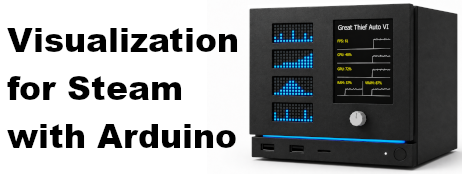
Arduino Nano R4 is now supported for compact, matrix-only builds with four
Modulino LED Matrix modules for FPS, CPU, GPU, and RAM metrics, making it the
most cost-effective supported configuration.
- Steamworks SDK updated to version 1.65.
Highlights
-
Hardware sensor monitoring now includes fan speed and CPU, GPU, DDR memory, and
NVMe drive temperatures on supported systems.
Sensor collection supports Windows, Linux, and SteamOS across common AMD, Intel,
and NVIDIA hardware.
-
The Windows app and its background hardware tools no longer open terminal windows
during normal use.
Highlights
-
Game statistics now include lifetime and recent playtime, achievement progress,
and current online player counter.
-
Game specific statistics is now displayed, with clearer handling for
games that do not provide custom statistics.
-
Player Achievement entries now show a progress bar when a matching custom-stat
value is available.
-
Double-click an input module to keep the current game's cover on screen until you
double-click again or change pages.
-
The desktop app can now start minimized to the system tray.
-
New About window added.
Additional supported control/input devices
- Modulino Buttons
- Modulino Joystick
Highlights
-
Newly unlocked Steam achievements now appear automatically on the TFT display,
complete with their image, name, and description.
-
Achievement lists now support hidden achievements without revealing their names.
-
Each global achievement entry now shows its world-wide unlock percentage with a
horizontal progress bar.
-
The desktop app can now discover connected I²C devices, reset the I²C bus, and
configure Modulino addresses from Settings window.
- Game covers and new-achievement screens now remain visible for 10 seconds.
Highlights
-
Live FPS data is now supported on Windows and Linux, with an FPS sourcing status
indicator in the desktop app.
-
VRAM usage is now collected and sent to the Arduino display on supported Windows
and Linux systems.
-
Steam game detection is now more reliable for Proton games and games started
through launchers.
- The desktop app now uses a refreshed application icon.
Highlights
-
Achievement screens now show achievement icons and a scrollbar for easier
navigation.
-
TFT screenshots can now be captured from the desktop app and saved as PNG files.
-
Firmware mismatch messages now show the detected and expected versions, with more
reliable detection after an Arduino power cycle.
-
Games with empty or unavailable achievement data are now handled gracefully.
Highlights
- Game cover images are now shown on the TFT color display.
-
The TFT screen has been rotated by 180° to provide more space for hiding the USB
cable.
Supported metrics
- Steam persona name and game name
- CPU, GPU, and RAM usage
- Player and global achievements where available
Supported setup
- Arduino UNO R4 Minima or UNO R4 WiFi.
- Adafruit 2.8-inch TFT Display Shield V2.
- Four Arduino Modulino LED Matrix panels.
- Arduino Modulino Knob input.